


What Is my TradingView Username?
TradingView Username is a unique identifier that is used to login to your TradingView account. It is also used to identify you on the TradingView platform, so it is important to choose a username that is easy to remember and unique.

How to setup AlgoBing on TradingView ?
Once you've signed up on our website and entered your active TradingView username within the "Connect Accounts" portal from
your email, It can take 4-6 hours to activate your trial due to time zone differences we will email you when its activated. In order to use the indicators, you need to open a chart on TradingView.

Once open, click on Indicators (or type /) to open the indicator menu, then click on "invite-only scripts", you should see the indicators names appearing, click on one of them to add it to your chart.
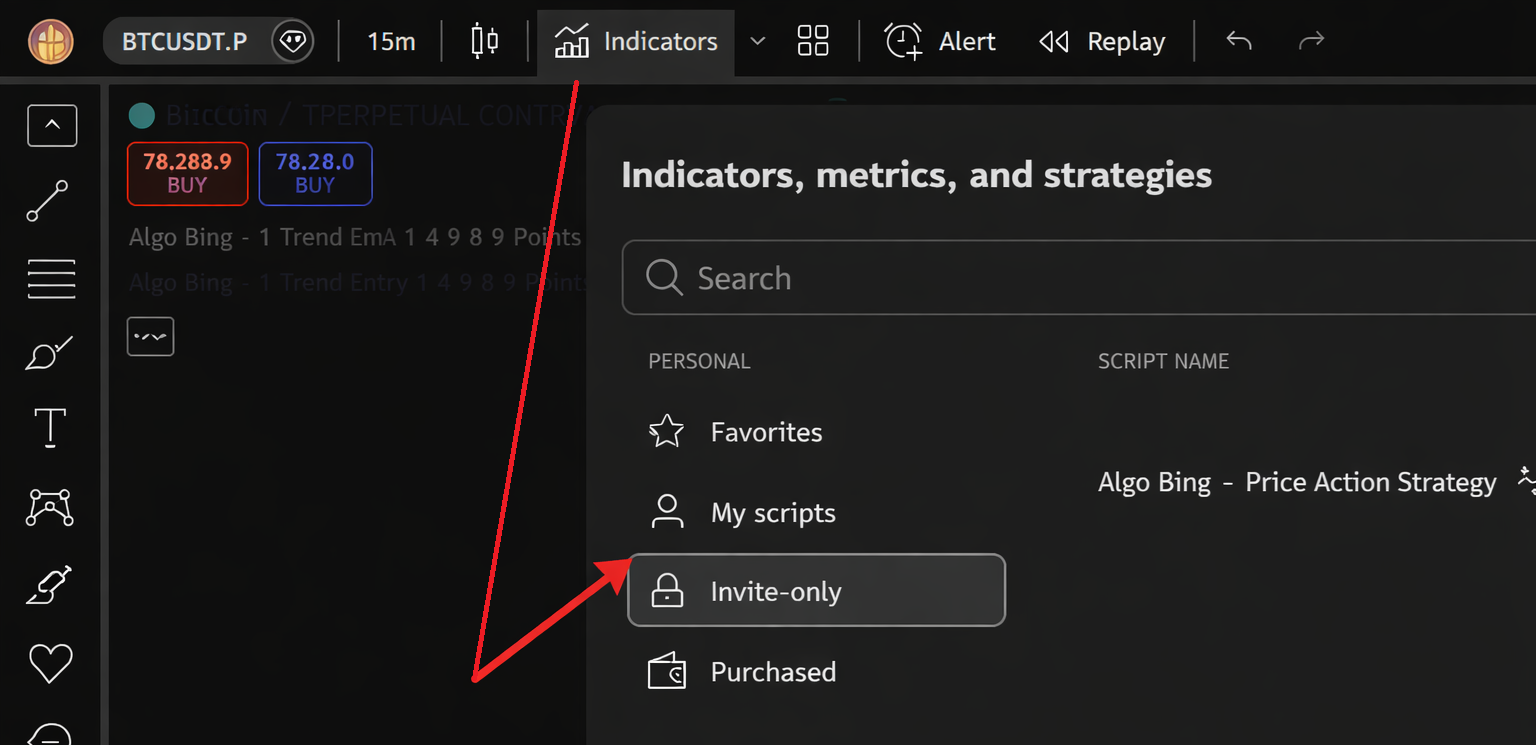
If you don't see the invite-only try refreshing your browser/app. If this still doesn't have them show up, please email info@algobin.com with your TradingView username & our team will grant you access manually within 6 hours.
If your strategy in Invite-Only access, please follow the steps below:
Click on the strategy once from the Invite-Only section.
Click Once When the strategy appears on your chart,
After the strategy is applied, refresh your browser or completely close and reopen TradingView.
Once reloaded, the strategy or indicator will automatically start working for you.